AI that does real work, and tools that talk to each other.
AI features inside your product, automations between the tools you already use, and MCP servers that let Claude and other assistants work in your product. Built by Marian Sorca, who runs 14 AI features in his own product.
Projects from $2,000 Reply within 24 hours
Start from the work, not the model.
- 01
“Our team does the same manual work every week.”
Automations - 02
“We have data nobody has time to read.”
Summaries and reviews - 03
“Customers ask the same questions again and again.”
An assistant on your own content - 04
“We want Claude or ChatGPT to work with our product.”
An MCP server - 05
“We want to know what changed, not read every row.”
AI insights in your app
And sometimes the answer is no AI at all. You’ll hear that first.
Three kinds of work, one standard.
AI inside your product
- Assistants that know your data model, not just your words
- Summaries and reviews of what happened
- Generation that lands in your product: plans, drafts, to-do lists
- Plain-language commands that do things, not just answer
Automations & integrations
- Make, Zapier and Cloud Functions, wired to webhooks and APIs
- Your CRM, invoicing, email and analytics, connected
- AI steps triggered on their own, such as a summary when a week closes
- Built to fail loudly, not silently
MCP servers
- Let Claude, ChatGPT and other assistants read and act in your product
- Permissions chosen per connection
- Every action logged, nothing deleted behind your back
The practices, and where they already run.
Every AI build gets the same care we put into our own product. These aren’t promises; they’re live in SelfManager.ai today.
Costs you can see. The right model per task, with usage limits.
Each model’s price in credits shows before a request is sent.
A fallback when a model fails. Your feature keeps working.
If a model is busy, Gemini answers instead.
Review before it saves. AI output doesn’t overwrite your data.
AI plans land in an editable preview before they’re committed.
Permissions you choose. AI sees and does only what it should.
The MCP server can read only, make changes, or write to shared tables. It can’t delete tables, tasks, notes or comments.
A trail of what AI did.
Every change through MCP is marked “(via Claude)” in the table’s log.
Your data stays yours.
Requests to Claude, GPT and Grok go straight to the provider, which doesn’t train on them.
Plus testing on real data, usage tracking and a documented handover.
Not a demo. Used every day.
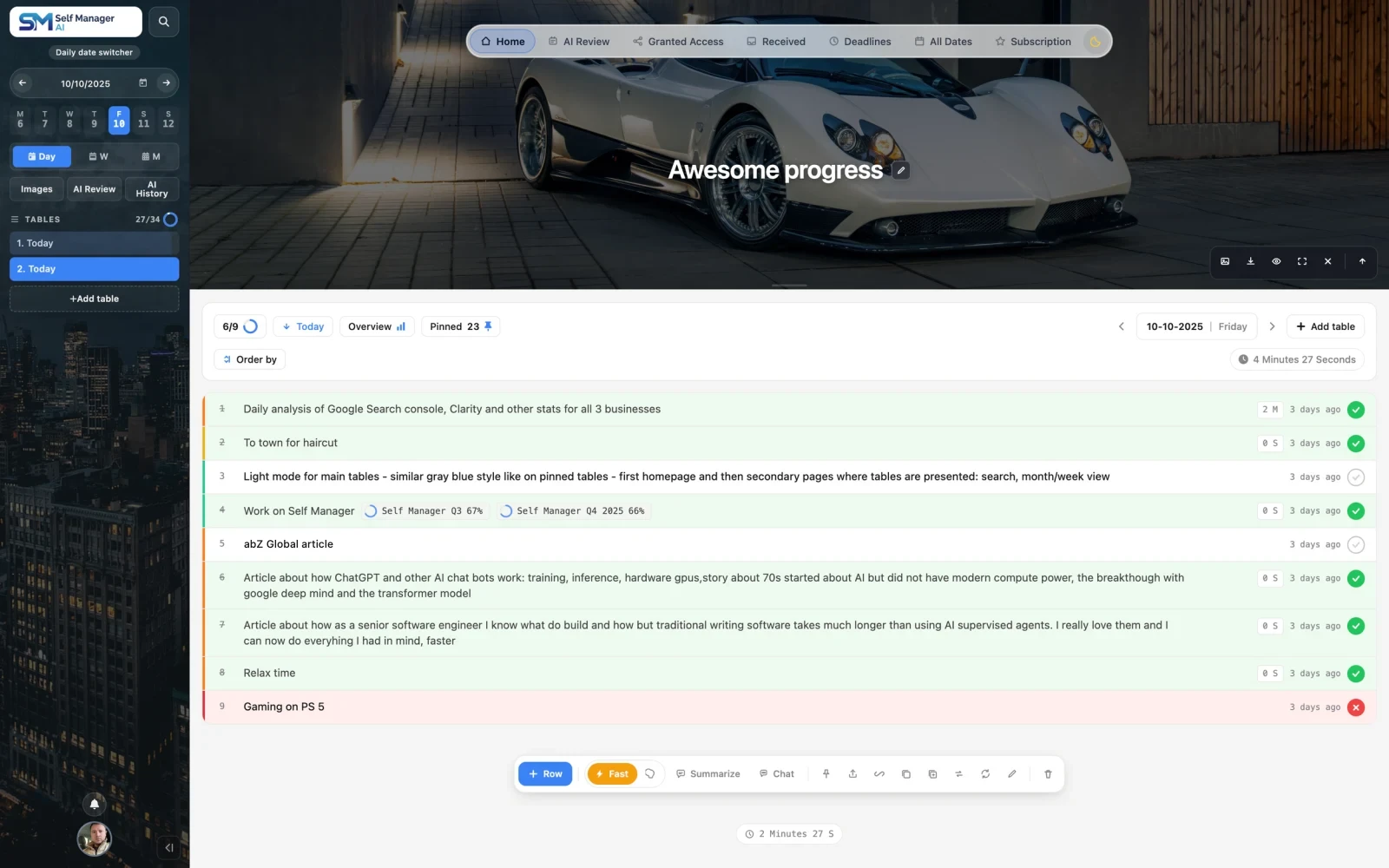
SelfManager.ai, AI built around real work.
A date-based task and project manager whose AI reads tables, statuses, priorities, time tracking, deadlines, comments and notes, then writes back into them. 14 AI features across 4 surfaces, 11 models in Fast and Thinking modes, and an MCP server in private beta.
Shopify, SmartBill and Make: a client’s invoicing, automated end to end.
Royal Labs: a multi-step inquiry form that submits straight into HubSpot.
“Communication was clear and efficient, the integration between SmartBill, Make, and Shopify was completed successfully and everything works smoothly.”
Your product, inside Claude and ChatGPT.
We built the MCP server for SelfManager.ai. Users connect Claude and ask in plain words: plan the day, tick a task, review the week. Each connection gets the permissions its owner chose, and every change is logged. It’s tested with Claude today, with more assistants next. We build the same for your product.
MCP serversWhat’s on my list today?
get_dayClaudeTwo tables today. Launch prep: 1 of 3 done, and “email beta users” is high priority. Gym: not started.
From selfmanager.ai/mcp
Small enough to ship, big enough to matter.
- 01Pick the use cases.
One to three, chosen from where time or money is lost today.
- 02Prototype on real data.
We test with your actual data, not dummy content, to see if it genuinely helps.
- 03Build it into your stack.
With limits, fallbacks and logging from day one.
- 04Launch, measure, extend.
Usage tracked, then the next use case.
The minimum engagement is $2,000. Each use case is scoped and priced before work starts.
Model-agnostic: Gemini, Claude, GPT and Grok, chosen per task. Automations with Make, Zapier and Cloud Functions; backends on Firebase and Node.js.
Questions before you start.
What does an AI project cost?
The minimum engagement is $2,000. Each use case is scoped and priced before work starts, and model costs are estimated up front.
What data does the AI see?
Only what the feature needs, under your rules. We decide that together before anything is built.
Which models do you use?
Whichever fits the task and the budget: Gemini, Claude, GPT or Grok. A fast, cheap model for simple steps, a stronger one where reasoning matters.
Will AI costs surprise us?
They shouldn’t. Usage limits and caching are built in, and you see what each feature costs to run.
What is an MCP server, and do we need one?
It’s how assistants like Claude and ChatGPT read and act inside other software. You need one if your customers or team should be able to use your product from their assistant. See MCP servers.
Can you add AI to a Shopify store?
Yes, where it pays: product content, search or support. We’ll tell you which, and which apps already do it well enough.
Do you work on visibility in ChatGPT or Google answers?
Not at the moment. We build the AI features and integrations; SEO and AI visibility aren’t part of our services.
Have a project in mind?
Tell us what you’re building and where it’s stuck. Within 24 hours you get useful questions and a proposed next step, or an honest answer if we’re not the right fit.
- 01Tell us about it.A few lines on the goal, the deadline and what exists today.
- 02A reply within 24 hours.Useful questions and a proposed next step, in writing.
- 03Scope and price agreed before work starts.Projects from $2,000. Ongoing fractional CTO work is billed monthly.